Related Industries
Curation by industry experts
Hot Articles
Popular Tags
How Do I Check NIC Compatibility Before a Cooling Retrofit?
How can I check NIC compatibility before a server cooling retrofit? Start by identifying each network interface card’s model, form factor, power draw, airflow requirements, and supported operating temperatures. Then compare those specifications with the proposed cooling method, server chassis, and rack configuration. For liquid or immersion cooling, check vendor guidance on materials, fluid exposure, warranties, and service access. The goal is not simply to confirm that a card fits: it is to establish that the NIC and its optical modules will remain within approved limits during real workloads, failures, and maintenance.
This question often surfaces after a cooling design is already taking shape. A team may have selected cold plates for CPUs and accelerators, only to discover that a high-speed NIC still depends on air moving through a now-altered chassis. Catching that dependency before equipment is ordered is much less disruptive than finding it during commissioning.
What information should I collect about each NIC?
Build an inventory at the level that engineering and procurement teams can verify. A server model alone is rarely enough: two otherwise similar machines may use different NIC revisions, risers, transceivers, or cable routes.
- Identification: Record the NIC manufacturer, exact part number, hardware revision, firmware version, and server configuration.
- Physical installation: Note the PCIe generation and slot, card height and length, riser, bracket, heatsink, adjacent cards, and clearances.
- Electrical and thermal data: Capture rated power, specified operating conditions, and any minimum airflow or inlet-temperature requirements.
- Network components: List transceiver part numbers, copper or optical cables, connector types, and any supported combinations.
- Support status: Identify whose documentation applies: the NIC maker, server OEM, transceiver supplier, and cooling-system provider may each define different limits.
Use current datasheets, server configuration guides, and written supplier responses where possible. A specification for a retail adapter may not describe the same airflow arrangement as an OEM card installed behind a particular riser. If the documentation is missing a value, mark it as unknown rather than assuming another card’s rating applies.
Does the proposed cooling method actually cover the NIC?
Different retrofit approaches expose the NIC to different risks. A compatibility review should follow the heat path from the card and its transceivers to the facility, not stop at the cooling system’s advertised capacity.
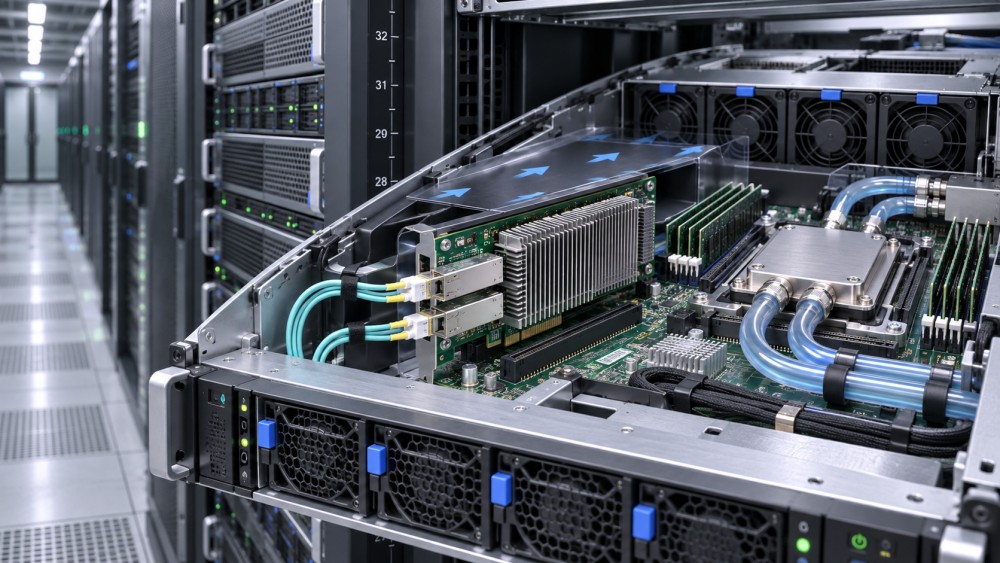
A rear-door heat exchanger may remove heat from server exhaust while the NIC remains air-cooled inside the chassis. Likewise, liquid cooling for processors does not automatically cool a PCIe adapter. Reducing server fan speed because the largest chips have cold plates can leave the NIC, its power circuitry, or the optical modules with insufficient airflow.
For immersion, “compatible with liquid cooling” is not specific enough. Direct-to-chip systems normally keep the coolant inside a closed circuit; immersion exposes equipment to a fluid. Approval for one approach does not establish approval for the other.
How can I tell whether airflow will still be sufficient?
Map the air route through the actual server: inlet, fans, ducts, heatsinks, risers, NIC, and exhaust. Compare the proposed configuration with the server vendor’s supported arrangement. A changed fan profile, removed air baffle, added tubing, or densely packed neighboring adapter can alter flow where the NIC needs it.
Look closely at how each limit is defined. A room temperature, rack inlet temperature, server inlet temperature, and NIC component temperature are different measurements. A supplier’s maximum ambient rating should not be treated as a maximum allowable ASIC or transceiver temperature. Similarly, a fan speed percentage does not by itself prove that the required airflow reaches the card.
Ask the server OEM which sensors and readings are appropriate for the configuration, and whether the platform reports NIC or transceiver temperatures. Some critical components may not have a readily accessible sensor. In those cases, agree on an instrumentation and test method with the equipment supplier rather than relying on an unrelated sensor elsewhere in the chassis.
Test under a representative network workload as well as the intended compute workload. A server running a processor stress test with little network traffic may not reproduce the NIC and optics heat generated during production transfers. Include expected peak traffic, relevant ambient conditions, and the server fan policies planned for operation.
What changes with direct-to-chip liquid cooling?
Direct-to-chip retrofits introduce hoses, manifolds, cold plates, and sometimes new management controls into an existing mechanical envelope. Even if none touches the NIC, their placement can affect adapter access or redirect airflow.
Check the clearance around the PCIe slot and riser with the actual hose bend radius and service position. Confirm that technicians can remove the NIC, disconnect its cables, and replace a transceiver without straining a liquid connection. Consider both routine service and the less convenient case of a failed card deep inside a populated rack.
Review leak-management arrangements around the adapter as well: connector placement, drip protection where specified, detection, isolation, and the steps required before handling affected equipment. Do not assume a NIC is protected merely because it is not connected to the liquid loop. The server OEM and retrofit supplier should explain how their combined design manages leakage and preserves electrical safety.
Finally, establish what happens when liquid flow is reduced or a cooling component fails. Processor thermal protection may respond quickly, but other components can still depend on chassis airflow. The relevant acceptance condition is the behavior of the complete server under the agreed failure scenario, not just the temperature of the cold-plated devices.
Which NIC and cable checks matter most for immersion cooling?
Immersion requires a more detailed materials and support review because the fluid may contact the adapter and nearby components directly. Ask for guidance that names the fluid, NIC part number and revision, operating conditions, and exposure period or test basis. A general statement about a fluid family is less useful than evidence tied to the proposed configuration.
Pay particular attention to:
- Materials and construction: Heatsinks, thermal interface materials, adhesives, plastics, coatings, labels, and connector materials may need assessment.
- Optics and cabling: Verify whether the selected transceivers and cable assemblies are approved for the intended exposure and routing. Check the transition from the tank to external network equipment.
- Service handling: Determine how cards are removed, drained or cleaned when required, stored, inspected, and returned for repair.
- Warranty and support: Obtain written terms for immersion exposure, modifications, replacement parts, and return authorization from the relevant suppliers.
Do not remove a NIC heatsink, change a thermal pad, or substitute a cable solely because another installation appears to use that arrangement. Such changes can affect thermal performance or support status. The fluid supplier’s approval is valuable, but it does not automatically replace the hardware manufacturer’s position.
Can a NIC pass the datasheet check and still fail in production?
Yes. Datasheets establish important boundaries, but they cannot represent every rack layout, workload, or service event. A card may be within its stated ambient range while a transceiver overheats because a cable bundle obstructs exhaust. A retrofit may work with one adapter installed but not with every neighboring slot populated.
Consider a server moving to direct-to-chip cooling. The NIC remains in its original slot, so the mechanical check initially looks straightforward. During an integration review, the team finds that a new hose route limits access to the cable release and that the planned lower fan setting has not been validated for the NIC configuration. Neither issue proves the design will fail, but both require resolution before the retrofit is treated as ready.
That distinction matters for schedules. “Physically fits,” “tested under stated conditions,” and “supported for production” are separate conclusions. Record each one and identify the evidence behind it.
How should the team validate compatibility before rollout?
Use a representative pilot server and rack configuration before committing to a broader installation. The pilot should include the intended NICs, optics, neighboring adapters, cable routing, cooling hardware, firmware, and fan controls. If production configurations differ materially, select additional tests or obtain supplier guidance for those differences.
- Agree on acceptance limits. Document the applicable vendor limits, measurement locations, workload, environmental conditions, and pass criteria before the test begins.
- Exercise the intended load. Run representative compute and network traffic together, including the periods when the NIC and transceivers are expected to be busiest.
- Observe operating behavior. Review available temperatures, fan responses, link stability, errors, throttling, and alerts. Investigate readings against the correct component limits.
- Test agreed abnormal conditions. Where safe and supported, evaluate relevant fan, coolant-flow, or control failures and confirm alarms and protective actions.
- Perform a service rehearsal. Replace or remove a representative adapter or transceiver using the planned procedure, with appropriate isolation and trained personnel.
- Retain the record. Store configuration details, software versions, test conditions, results, unresolved issues, and supplier approvals with the change documentation.
A short test at a favorable inlet temperature is not evidence for every season or rack position. If the pilot cannot reproduce the full operating envelope, state that limitation and agree on additional validation or operating restrictions before expansion.
Who should confirm the final decision?
Bring server engineering, network operations, facilities, procurement, and maintenance into the review. The network team can identify link and optics requirements; server engineers can assess slots, firmware, and airflow; facilities staff can evaluate cooling interfaces and failure response. Procurement should ensure that the quoted configuration and support terms match what was tested.
Ask suppliers to resolve conflicts in writing. For example, if the NIC datasheet permits an operating condition that the server OEM does not support in that chassis, the broader card rating is not a substitute for an approved server configuration. Escalate unresolved limits, unknown fluid exposure, and inaccessible service points rather than treating them as minor commissioning details.
The practical answer is a traceable one: identify the exact components, verify the cooling and service conditions around them, and test the assembled configuration against agreed limits. When those checks are complete, the retrofit decision rests on documented evidence rather than the reassuring but incomplete fact that the NIC fits in its slot.
Questions about data center smoke detection standards? Contact RackLedger for further insights.
We respect your privacy. Your information is strictly confidential.
Recommended News
 Data Center Variable Frequency Drives: Cutting Fan and Pump Energy UseData Center Variable Frequency Drives can cut fan and pump energy use. Explore retrofit opportunities, costs, risks, and practical steps to protect cooling reliability.Nov 04, 2026
 Why Is My Coolant Temperature Sensor Reading Too High?How do I troubleshoot a coolant temperature sensor that reads too high? Verify the reading, trace cooling and control faults, and protect data center equipment.Nov 04, 2026
 Where Should Coolant Temperature Sensors Be Placed in a Loop?Where should coolant temperature sensors be placed in a liquid cooling loop? Explore CDU supply, return and rack-level locations for reliable monitoring.Nov 04, 2026
 How Do I Size a Coolant Reservoir for a Liquid Cooling Retrofit?How do I size a coolant reservoir for a liquid cooling retrofit? Learn how to calculate usable capacity, check pressure and avoid costly sizing mistakes.Nov 04, 2026