Related Industries
Curation by industry experts
Hot Articles
Popular Tags
Do NICs Need Separate Cooling in a Direct-to-Chip Retrofit?
Do network interface cards need separate cooling in a direct-to-chip retrofit? The answer depends on the NIC’s power draw, server airflow, and operating conditions. While liquid cold plates remove heat from processors, network adapters and other components often still rely on air cooling. For data center operators and facility engineers, overlooking these residual loads can affect reliability and limit retrofit performance. The practical question is not whether every NIC needs its own liquid loop, but whether the installed server can keep each adapter within its specified thermal limits after the retrofit.
Liquid cooling changes the heat path, not the need for airflow
A direct-to-chip system typically places cold plates on selected high-power components, such as CPUs or accelerators. Coolant carries much of their heat to a coolant distribution unit or another heat-exchange interface. Unless the design explicitly includes the network adapters, however, NICs generally continue to reject heat into the server’s air stream.
The same is often true of memory, storage devices, voltage regulators, power supplies and optical modules. Their combined load is sometimes described as residual air-side heat. Its size depends on the actual server configuration and on which components the liquid loop cools. A rack with a substantial liquid-cooled load can still need considerable room or rack-level air cooling.
There is also a difference between removing enough heat from the room and delivering enough air to a particular adapter. A cooling system may keep the rack inlet within its target range while a NIC behind a cable bundle runs too hot. Component temperature depends on local airflow, air temperature at the card and the effectiveness of its heat sink—not just on the room thermostat.
When existing server fans may be enough
A separate NIC cooling device is not automatically required. In a supported server configuration, the existing fan system and airflow guides may provide sufficient cooling for the installed cards, even after processors move to cold plates. That conclusion needs to be established for the finished configuration, not assumed from the fact that the original air-cooled server worked.
Start with the server manufacturer’s approved adapter list and thermal configuration guidance. Then check the NIC vendor’s requirements for the specific card, heat sink and slot. A card’s operating temperature limit alone is not enough: installation guidance may also specify airflow, inlet temperature, slot restrictions or other conditions. Measurements need to use the same sensor location and interpretation as the applicable limit.
Pay particular attention when a retrofit changes fan controls. A server that senses cooler processors may reduce fan speed, depending on its control logic. That can leave an air-cooled NIC with less airflow precisely when the processor temperatures appear healthy. Confirm whether the platform has a supported liquid-cooling fan profile and whether its controls respond to adapter or other relevant sensors.
Where the airflow goes wrong
The physical installation matters as much as the cooling capacity on paper. Cold-plate hoses, manifolds and new cable routes can obstruct a previously workable air path. Removing an original processor heat sink or air shroud may also change how air is distributed through the chassis. Even an apparently small gap around a missing blanking panel can let air bypass the components that need it.
Trace the route from the server inlet through the NIC heat sink to the exhaust. Check whether the card receives fresh inlet air or air already warmed by another component, and whether the adapter expects a particular airflow direction. Confirm that hoses and connectors remain clear when the server is installed and when it is pulled out for service.
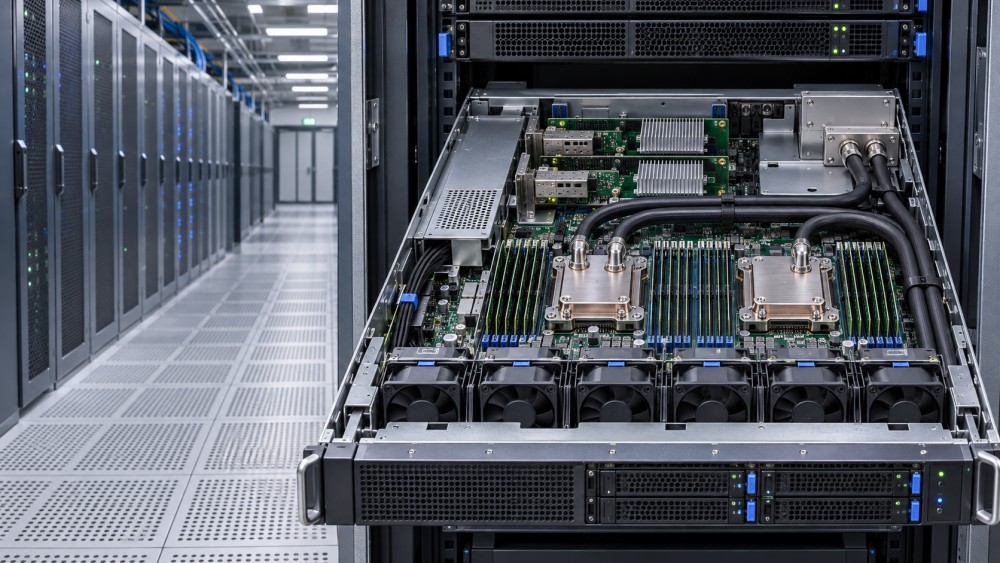
High-speed networking deserves special attention, particularly where several adapters or optical modules are concentrated in one chassis. The NIC controller, port modules and nearby components may have different thermal limits. A healthy controller reading does not necessarily prove that every pluggable module is within its own operating range. Check module telemetry where it is available and compare it with the relevant module documentation.
Build a heat budget before changing the rack
A useful starting point is the rack’s expected IT electrical input under the workload being designed for. Estimate how much heat the liquid system captures and how much remains on the air side, using supplier data that matches the proposed components and operating conditions. Account separately for equipment outside the server liquid loop and for any cooling-system power or heat that falls within the chosen boundary.
For an illustrative calculation, if a rack has a 40 kW IT load and a validated configuration removes 30 kW through liquid, approximately 10 kW remains to be managed by air. Those figures are an example, not a typical capture rate. The real split changes with hardware, utilization, coolant conditions and what the cold plates actually cover.
The rack calculation informs room and rack cooling decisions; it does not validate the NIC. A single adapter can overheat even when the aggregate residual load is within the air system’s capacity. Conversely, adequate local fan performance does not establish that the room can handle the combined exhaust from multiple retrofitted racks.
Keep average demand, expected peak demand and design capacity distinct. AI training and inference can produce different processor and network utilization patterns, so a thermal test based only on a processor stress tool may miss a heavily loaded network adapter. Include the intended network traffic, link configuration and optical modules in the assessment.
Choosing an intervention when the NIC runs hot
The least disruptive correction is often to restore or improve the intended air path. That might mean rerouting hoses and cables, reinstalling approved shrouds, fitting missing blanks, changing to a supported slot or using a manufacturer-approved fan profile. A higher fan speed can help, but it also changes power consumption, noise and potentially fan wear; it should not be treated as a free fix.
If the chassis cannot deliver the required airflow, a compatible duct, fan kit or different server configuration may be necessary. Check whether the proposed modification is supported by the server and adapter suppliers, including its effect on service access and warranty terms. An improvised duct that cools one card while starving another is not a reliable solution.
Direct liquid cooling of the NIC is another possibility where a compatible, validated design exists. It may be justified by the adapter’s thermal requirement or by a broader server design that cannot provide enough air. But it adds interfaces and maintenance dependencies: cold-plate fit, coolant and material compatibility, hose routing, leak management, pressure drop and replacement procedures all need review. Adding a plate to an unsupported card can create mechanical or electrical risks, as well as make field replacement harder.
Rack-level air cooling can address residual heat or hot exhaust, but it cannot automatically repair a poor airflow path inside a server. Likewise, a more capable coolant distribution unit will not cool an air-cooled NIC unless the rest of the design transfers that heat to the liquid loop. Match the remedy to the location of the constraint.
Commission the complete configuration, not just the cold plates
Thermal acceptance should cover the actual server population, rack layout, cable arrangement and cooling controls. Document the installed NIC and module models, slot positions, firmware, fan profile and relevant supplier limits before testing. Changes to any of these can alter the result.
During a representative sustained workload, record rack and server inlet conditions, available NIC and optical-module temperatures, fan speeds, power and any thermal warnings or throttling. Compare readings with the correct component limits and preserve the operating conditions alongside the results. A temperature reading without its workload and inlet context is difficult to use as evidence for a wider rollout.
Test the conditions the operating plan expects to tolerate, including supported fan-failure or cooling-degradation scenarios where safe and approved. Coordinate these tests with the equipment suppliers and facility operations team. A system that passes only with every fan at full speed may have little practical margin for a fault, a warmer inlet or dust accumulation.
Acceptance should also address what happens after installation. Define temperature alerts, escalation thresholds and the response to a failed fan, blocked filter or NIC thermal alarm. Verify that technicians can replace an adapter without disturbing liquid connections unnecessarily, and establish when the server must be isolated or drained. If telemetry is unavailable for a critical component, agree on an approved alternative validation method rather than treating missing data as a pass.
The retrofit decision
Separate liquid cooling for NICs is a design option, not a default requirement. Separate thermal verification, on the other hand, is essential: processor temperatures and rack-level liquid capture figures do not demonstrate that network hardware has adequate airflow.
Before approving a deployment, bring the server vendor, network adapter supplier and facility team together around the same configuration and test boundary. Ask for the supported airflow arrangement, expected residual air-side load, component limits and service procedure. RackLedger’s planned coverage follows this connection between computing equipment and physical infrastructure: the useful answer is the one that remains valid in the installed rack, under the workload and operating conditions it must actually support.
Questions about data center smoke detection standards? Contact RackLedger for further insights.
We respect your privacy. Your information is strictly confidential.
Recommended News
 Data Center Variable Frequency Drives: Cutting Fan and Pump Energy UseData Center Variable Frequency Drives can cut fan and pump energy use. Explore retrofit opportunities, costs, risks, and practical steps to protect cooling reliability.Nov 04, 2026
 Why Is My Coolant Temperature Sensor Reading Too High?How do I troubleshoot a coolant temperature sensor that reads too high? Verify the reading, trace cooling and control faults, and protect data center equipment.Nov 04, 2026
 Where Should Coolant Temperature Sensors Be Placed in a Loop?Where should coolant temperature sensors be placed in a liquid cooling loop? Explore CDU supply, return and rack-level locations for reliable monitoring.Nov 04, 2026
 How Do I Size a Coolant Reservoir for a Liquid Cooling Retrofit?How do I size a coolant reservoir for a liquid cooling retrofit? Learn how to calculate usable capacity, check pressure and avoid costly sizing mistakes.Nov 04, 2026